


Streaming subscriptions have a habit of piling up. Netflix here, Disney Plus there, maybe another service for one show you wanted to watch — and suddenly movie night comes with its own monthly bill.
Fortunately, there are still some genuinely useful free movie apps for iPhone that don't require another subscription. Most keep the lights on with ads, while a few work through public libraries. And because nearly all of our picks also run on iPad, you can move to a bigger screen without changing services.
We've focused on legitimate apps that are readily available for iOS rather than unofficial movie apps or IPA downloads that may disappear without warning. If you simply want to watch a movie without paying every time you press play, these are the free movie apps for iPhone and iPad we'd start with.

Best Free Movie Apps for iPhone and iPad at a Glance
Tubi is our best overall pick, while Pluto TV is better for viewers who like live channels. Plex stands out if you also keep your own media library, and Kanopy or Hoopla can be excellent choices if your library provides access.
- Tubi: Best overall — free with ads.
- Pluto TV: Best for live TV and movies — free with ads.
- Plex: Best for free movies and personal media — free with ads.
- Kanopy: Best for library card holders — free through participating libraries.
- Hoopla: Best for movies plus other library content — free through participating libraries.
- Xumo Play: Best for watching without an account — free with ads.
- Fandango: Best for free movies plus rentals — free titles include ads.
- The Roku Channel: Best for Roku users — free content with ads.
Availability and movie catalogs vary by location and change over time. The recommendations below are primarily aimed at users in the US.
Can I Watch Free Movies on an iPad Too
Yes. Most of the best free movie apps for iPad are the same services we'd recommend for the iPhone. In many cases, the iPad is actually the better device for a full-length movie because its larger display is more comfortable for longer viewing sessions.
Live-channel apps such as Pluto TV and Xumo Play also work particularly well when the tablet is propped up on a stand. Just check the current App Store compatibility requirements if you're using an older iPhone or iPad, as minimum iOS and iPadOS versions change when apps are updated.
Best 8 Free Movie Apps for iPhone and iPad
1. Tubi – Best Free Movie App Overall
Best for: Anyone who wants a large movie library without paying for another streaming subscription.
Tubi is the easiest recommendation on this list. It combines on-demand movies, TV shows and live programming in a single app, and you don't need to subscribe to a paid plan before you can start watching. The service is supported by advertising instead.
What makes Tubi particularly useful is the amount of choice. You'll find mainstream studio movies mixed with older releases, independent films, documentaries, horror and plenty of titles you probably wouldn't have gone looking for. It also feels equally at home on an iPhone and an iPad.

Pros
- Large selection of free movies and TV shows
- No paid subscription required
- Works on both iPhone and iPad
- Includes live programming as well as on-demand video
Cons
- Movies include commercial breaks
- Popular titles can come and go as licensing changes
- You won't find every new theatrical release
2. Pluto TV – Best Free Movie App for Live TV
Best for: Anyone who likes channel surfing as much as choosing a movie on demand.
Pluto TV feels noticeably different from a typical Netflix-style streaming service. You can browse a library of movies and shows whenever you want, but a large part of the appeal is its collection of live channels.
That works particularly well when you don't know what you want to watch. Instead of scrolling through thumbnails for half an hour, open a movie channel and see what's already playing. On an iPad sitting on a desk or kitchen counter, it can feel surprisingly close to having a small television beside you.

Pros
- Free on-demand movies plus live channels
- Good fit for both iPhone and iPad
- Useful when you don't want to choose a specific movie
- Covers movies, news, sports and TV
Cons
- Ads interrupt movies and live programming
- Live channels give you less control over what plays next
- The on-demand catalog changes over time
3. Plex – Best for Free Movies and Personal Media
Best for: People who want free streaming and their own movie collection in the same app.
Plex has a little more going on than most of the free movie apps for iPhone in this guide. Alongside free, ad-supported movies and live TV channels, Plex can also organize and stream media stored on your own computer or media server.
You don't need a personal movie library to use it. Plex also offers hundreds of free, full-length movies across multiple genres. Tubi is quicker if all you want to do is find a free movie and press play, but Plex makes more sense if you want one app that can grow into a larger media setup.

Pros
- Free full-length movies and live TV
- Supports iPhone and iPad
- Can organize your own movie and TV library
- Useful across multiple devices
Cons
- Interface can feel busier than simpler streaming apps
- Some advanced Plex features are paid
- Ad-supported titles include commercial breaks
4. Kanopy – Best for Library Card Holders
Best for: Viewers interested in documentaries, independent cinema and critically acclaimed films.
Kanopy is the outlier on this list in a good way. Instead of showing ads, it works with participating libraries and universities. If your library provides access, you can sign in with your library card and stream films without paying for a separate subscription.
Its catalog also feels different from most free streaming services, with a stronger emphasis on documentaries, festival films, independent movies, educational content and collections such as Criterion. The obvious limitation is that access depends on your library or institution.

Pros
- No advertising during movies
- Strong selection of documentaries and independent films
- Available for iPhone and iPad
- Free through participating libraries
Cons
- Requires an eligible library or university account
- Access rules vary between libraries
- Less focused on current mainstream blockbusters
5. Hoopla – Best for More Than Just Movies
Best for: Library users who also want ebooks, audiobooks, comics and other digital content.
Hoopla is another service worth checking before you pay for a new streaming subscription. Like Kanopy, access comes through participating public libraries rather than a conventional monthly entertainment plan.
Movies are only one part of it. Hoopla also covers ebooks, audiobooks, comics, manga and other digital library content, which makes the app useful well beyond movie night. That broader focus is also its main weakness as a movie app: viewers who only want a large streaming catalog may find Tubi or Pluto TV easier to browse.

Pros
- Free with participating library memberships
- Movies sit alongside books, audiobooks and comics
- No separate entertainment subscription required
- Works across iPhone and iPad
Cons
- Requires a supported library card
- Borrowing limits depend on your library
- Movie selection can be smaller than dedicated streaming services
6. Xumo Play – Best for Watching Without an Account
Best for: Anyone who wants to open an app and start watching with as little setup as possible.
Xumo Play keeps things simple. There is no subscription requirement and you don't need to create an account just to start watching. The app combines on-demand movies and shows with hundreds of live channels.
That makes it a good alternative to Pluto TV, especially if you like the idea of live television but don't want another username and password to remember. If Tubi or Pluto TV doesn't have the movie you want, Xumo is a useful second or third app to keep installed.

Pros
- No subscription required
- No login needed for basic viewing
- Includes live channels and on-demand movies
- Works on iPhone and iPad
Cons
- Supported by advertising
- Movie selection isn't as recognizable as some larger services
- Recommendations can be hit or miss
7. Fandango – Best for Free Movies and New Rentals
Best for: People who want free movies but occasionally rent or buy newer releases.
Fandango takes a different approach from most apps in this list because not everything inside it is free. Alongside movies available to stream at no cost with commercials, you'll also find newer titles that can be rented or purchased.
That mix can be useful if you mostly watch free movies but occasionally want a recent release. You don't have to maintain a monthly subscription just to get access to paid rentals, although you do need to pay attention while browsing because free and paid titles live in the same app.

Pros
- Thousands of free movies and TV shows
- No subscription required for free titles
- Also offers newer movies to rent or buy
- Works on iPhone and iPad
Cons
- Not everything in the app is free
- Free movies contain commercials
- Free and paid titles can appear side by side
8. The Roku Channel – Best for Roku Users
Best for: Anyone who already uses a Roku device at home.
The Roku App lets iPhone and iPad users access free movies, live TV and other Roku Channel content on the go. It becomes much more useful if you already own Roku hardware because the app can also work as a remote and support private listening through headphones.
Without a Roku device, we'd probably install Tubi or Pluto TV first. For an existing Roku household, though, keeping the official app on your iPhone or iPad makes plenty of sense.

Pros
- Free movies and live TV
- Particularly useful for existing Roku users
- Works on both iPhone and iPad
- Doubles as a Roku remote
Cons
- Much of the app's appeal depends on owning Roku hardware
- Free content includes ads
- Not as focused on movies as Tubi
DearMob iPhone Manager - Manage Movie Apps/Videos on iPhone
If you also keep downloaded videos on a computer or regularly move media between your iPhone, iPad and desktop, DearMob iPhone Manager can help you organize the files without relying on cloud storage. It can transfer movies between an iPhone or iPad and a computer, back up device data, and manage installed apps from the desktop.
Why Should You Pick DearMob iPhone Manager
- Transfer movies and other videos between iPhone, iPad and computer
- Back up and restore iPhone and iPad data
- Organize, remove and manage apps from the desktop
- Manage photos, music, videos, contacts and other iOS data
- Use wired or wireless transfer for supported media tasks

How to Install Free Movie Apps for iPhone with DearMob iPhone Manager
Step 1: Choose a valid download link of the *.ipa file for the free movie app you'd like to download and click to save it on your computer.
Step 2: Launch DearMob iPhone Manager. Connect your iPhone to your computer. Tap "App" on its main UI.
Step 3: Click "Install" and choose the IPA file you just downloaded. Then sync the movie app to your iPhone.
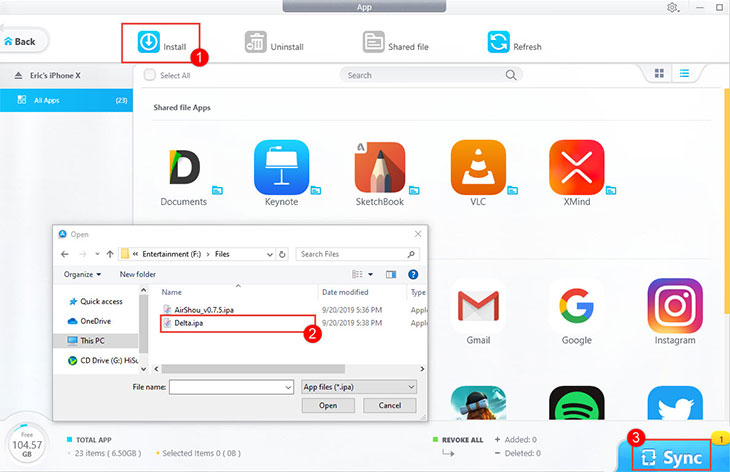
Step 4: Disconnect your iPhone and the computer. Now you can find the free movie app installed on your iPhone.
Which Free Movie App for iPhone Should You Choose
If you just want one recommendation, Tubi is the best place to start. It has a large free catalog, doesn't require a paid subscription and is easy to use on either an iPhone or iPad.
Pluto TV is the better pick if you like the idea of live channels and want something playing without having to choose a specific movie first. Plex is more interesting for anyone who keeps movies on a computer or home media server, while Xumo Play is worth having around if you want streaming without creating another account.
Don't overlook Kanopy and Hoopla either. A library card can unlock surprisingly good content, and Kanopy in particular offers movies that are harder to find on mainstream ad-supported services. There is also no real reason to limit yourself to one app. Installing two or three free services gives you a much wider selection without adding another monthly bill.
Free Movie Apps for iPhone and iPad FAQ
1. What is the best free movie app for iPhone?
Tubi is our top pick for most users because it offers a large selection of free on-demand movies without requiring a paid subscription. Pluto TV is a strong alternative if you also want live channels.
2. What is the best free movie app for iPad?
The same apps work well on both devices, but Pluto TV and Xumo Play are particularly well suited to the iPad because their live-channel interfaces feel natural on a larger screen.
3. Can I watch movies for free on my iPhone without a subscription?
Yes. Apps including Tubi, Pluto TV and Xumo Play offer free, ad-supported streaming without requiring a traditional paid subscription.
4. Are free movie apps legal?
The apps recommended in this guide are legitimate services available through Apple's App Store. Free content is typically funded through advertising or access agreements with participating libraries.
5. Is there a free movie app without ads?
Kanopy is one of the best options if your library or university participates. It provides free streaming without advertising, although access requires an eligible library or institutional account.
6. Do I need an account to watch free movies?
It depends on the service. Xumo Play lets you start watching without a subscription or login, while library-based services such as Kanopy require an account linked to an eligible library.
7. What happened to Showbox, Moviebox and other old free movie apps?
Older lists of free movie apps often included names such as Showbox, Moviebox, Cinema Box and similar services. They were also frequently paired with instructions for installing IPA files outside Apple's App Store.
We wouldn't build a current list around those apps. Unofficial services can disappear or stop working with little warning, installation methods change, and it's much harder to know exactly what you're installing when an app comes from an unverified source. More importantly, there are now enough legitimate free streaming apps on iPhone and iPad that most people don't need to go through the trouble.
Final Verdict
You don't need to pay for half a dozen streaming subscriptions to find something worth watching on an iPhone or iPad.
Tubi remains the strongest all-round choice, Pluto TV is excellent when you want free movies mixed with live channels, and Plex offers more flexibility if you maintain your own media collection. Kanopy is the standout option for library users who prefer documentaries, independent cinema and other less mainstream films.
The catalogs won't always include the exact movie you're looking for, and ad-supported services inevitably come with commercial breaks. But keeping two or three of these free movie apps for iPhone and iPad installed can cover a surprising amount of your everyday viewing without adding another recurring charge.