


Accidentally deleted a Snapchat photo on your iPhone? Whether you can get it back depends on where the photo was stored before it disappeared. If the Snap was saved to your iPhone Photos app, it may still be in the Recently Deleted album. If it remains in Snapchat Memories, you can export another copy to your Camera Roll. You may also find older copies in Snapchat's My Data export or an iPhone backup.
However, there is one important limitation: if you permanently delete a Snap from Snapchat Memories, Snapchat says it cannot restore it once it has been removed from its servers. The methods below are therefore most useful for finding another saved copy rather than recovering a permanently deleted Memory.
How to Recover Deleted Snapchat Photos on iPhone
Fix 1. Check the Recently Deleted Album
Start with the Photos app if the Snapchat photo or video was previously saved or exported to your iPhone Camera Roll. Deleted photos and videos remain in Apple's Recently Deleted album for up to 30 days before they are permanently removed.
Step 1. Open the Photos app on your iPhone.
Step 2. Scroll down and open Recently Deleted. You may be asked to authenticate with Face ID, Touch ID, or your passcode.
Step 3. Find the Snapchat photo or video you want to restore, select it, and tap Recover.
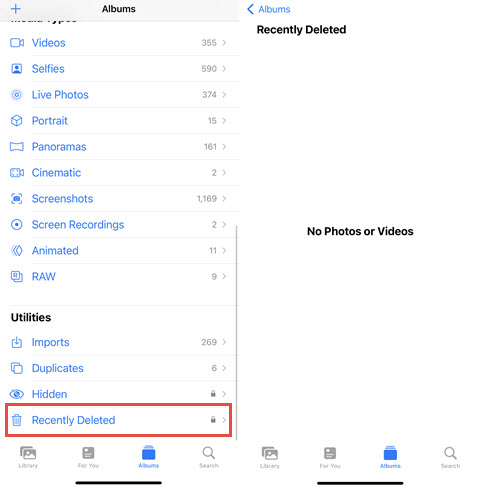
Keep in mind: Snapchat does not automatically save every Snap you send or receive to the Photos app. This method only works if a copy had previously been saved to your Camera Roll.
Fix 2. Check Snapchat Memories
If you deleted the copy stored in your iPhone Photos app but still have the original saved in Snapchat Memories, you can simply export it again.
Step 1. Open Snapchat and swipe up from the Camera screen to open Memories.
Step 2. Look through your saved Snaps and find the photo or video you need.
Step 3. Press and hold the Snap, or open it and tap the menu button.
Step 4. Select Export Snap, then save it to your Camera Roll or another location.
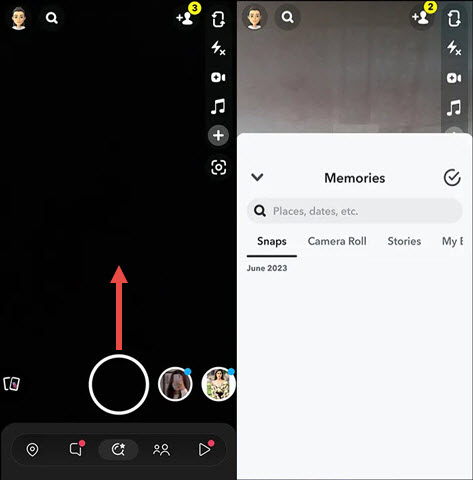
Note: This works when the Snap still exists in Memories. If you intentionally deleted the Memory itself from Snapchat, Snapchat states that deleted Memories cannot be recovered by Snapchat Support. If a Memory appears to be missing even though you did not delete it, make sure Snapchat is updated and check that your Memories backup has completed before assuming the file is permanently gone.
Fix 3. Check Snapchat My Data
Snapchat lets you request an export of data that is still associated with your account. Depending on what Snapchat still retains, the download can include account information, Snap history, saved chat history, Memories, and other data. This can be useful when a Memory is missing from the app but may still exist in your Snapchat account.
Step 1. Open Snapchat and go to Settings.
Step 2. Find My Data and sign in to your Snapchat account if prompted.
Step 3. Choose the data you want to export. If available, you can request an export specifically for your Memories.
Step 4. Submit the request. Snapchat will notify you when the export is ready. Processing time varies depending on the amount of data and may take several days.
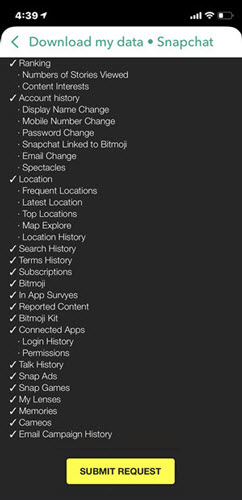
Note:
- After downloading the archive, extract it and check whether the photo or Memory you need is included.
- My Data is not a recycle bin for permanently deleted Snaps. If Snapchat has already removed a deleted, viewed, expired, or intentionally deleted Memory from its servers, requesting your data will not bring it back.
Fix 4. From iCloud/iTunes Backup
An older iPhone backup may help if a copy of the Snapchat photo was previously stored locally on your device. Before using this method, understand that restoring an iCloud, Finder, Apple Devices, or iTunes backup normally restores the state of the entire device rather than letting you select a single Snapchat photo.
For an iCloud backup:
Step 1. Check whether you have a backup from before the photo was deleted.
Step 2. If necessary, back up your current iPhone first so that you do not lose newer data.
Step 3. Go to Settings > General > Transfer or Reset iPhone > Erase All Content and Settings.
Step 4. During setup, choose Restore from iCloud Backup and select the appropriate backup.
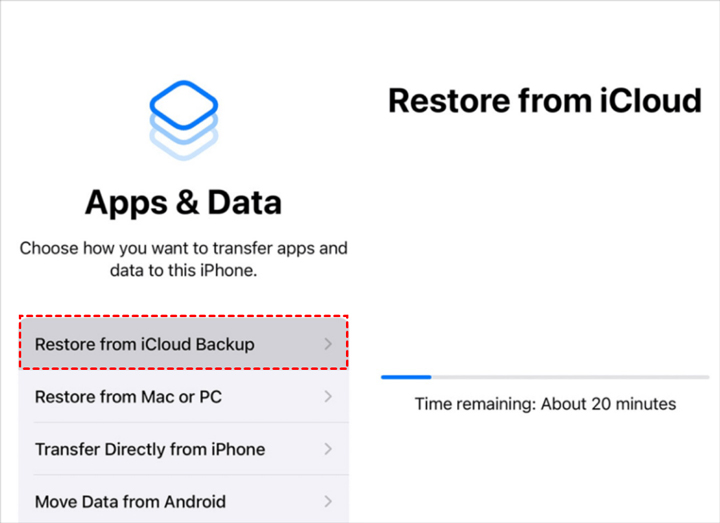
Note:
- You can also restore a computer backup through Finder on Mac, the Apple Devices app on newer Windows systems, or iTunes where it is still supported.
- If you use iCloud Photos, your photos and videos are synchronized separately with iCloud and are generally not included again in your iCloud device backup. Deleting a photo from iCloud Photos normally also removes it from your synced devices, although it remains in Recently Deleted for 30 days.
- Restoring an old iPhone backup also cannot restore a Snapchat Memory that has already been permanently deleted from Snapchat's servers.
Fix 5. Try a Data Recovery Tool for Local Copies
If the photo once existed locally on your iPhone or inside a device backup, third-party iPhone data recovery software may sometimes help locate an older copy. Programs such as iMyFone, FoneLab, and similar recovery utilities typically work by scanning accessible device data or existing computer backups for recoverable files. However, expectations are important.
A third-party recovery tool cannot restore a Snapchat Memory that Snapchat has already deleted from its servers. It may only be useful if a local copy of the image once existed in your Camera Roll, app data, or an older device backup. For that reason, try the built-in recovery options above before paying for recovery software.

DearMob iPhone Manager - Best Way to Back Up and Recover Your Deleted Photos on iPhone
- Recover deleted photos on iPhone from last backup
- Selectively or entirely backup/restore 15+ file types on iPhone: photos, videos, etc.
- Transfer data from iPhone to Mac and Windows with ultra-flexibility; Lightning-fast and stable file transfer without freezing.
- Compress large files, convert to Apple-supported format, encrypt files, unlock DRM, and more...

How to Prevent Losing Snapchat Photos Again
If a Snap matters to you, relying on Snapchat alone is not the safest approach.
You can change Snapchat's save settings so that important Snaps are stored in both Memories and Camera Roll. In Snapchat, go to Settings > Memories > Save Button and choose Memories & Camera Roll.
You should also periodically check the Backup Progress status in Snapchat Memories and make sure it shows Complete before signing out, deleting Snapchat, or moving to a new phone. For especially important Memories, consider exporting an additional copy to your iPhone, computer, or another cloud storage service.
FAQs
1. Can You Recover Permanently Deleted Snapchat Photos?
It depends on where the photo was stored. If the photo was saved to your iPhone, you may still be able to restore it from Recently Deleted or an older device backup. If the Snap still exists in Snapchat Memories, you can export another copy. However, Snapchat says that Memories that have been intentionally deleted and removed from its servers cannot be recovered by Snapchat Support.
2. Can Snapchat My Data Recover Deleted Photos?
Not necessarily. My Data lets you download information and media that Snapchat still retains for your account, including certain Memories and account history. It does not restore content that Snapchat has already permanently deleted from its servers. It is therefore more useful for finding missing or still-stored content than for recovering a permanently deleted Memory.
3. How Long Does Snapchat Keep Unopened Snaps?
Snapchat's current retention rules vary depending on the type of content and conversation. For standard unopened Snaps, Snapchat generally deletes them automatically after 31 days. Snaps that have been viewed are normally deleted from Snapchat's servers after they have been opened by all recipients, although some content can be saved or retained in Chat depending on the conversation settings. Because Snapchat's retention rules can vary, important photos and videos should be saved to Memories, Camera Roll, or another backup location rather than relying on Snapchat's temporary storage.
4. Can a Data Recovery App Recover Deleted Snapchat Memories?
Not if the Memory has already been permanently removed from Snapchat's servers. Recovery software may be able to find a local copy that previously existed on your iPhone or in a device backup, but it does not have special access to deleted Snapchat server data.